
Lesson overview
Use count-controlled loops when the number of repeats is known.
Focus: Count-controlled loops.
What you will learn
- Explain when a count-controlled loop is suitable.
- Identify start, end and step values.
- Trace how a loop counter changes.
- Use loops to avoid repeated copied instructions.
Before you start
- Sequence and iteration.
- Variables and assignment.
- Basic trace-table skills.
Repeat-known-times tasks
Use the countdown, times-table and total-score examples to practise choosing and tracing counted loops.
Count-controlled loops infographic
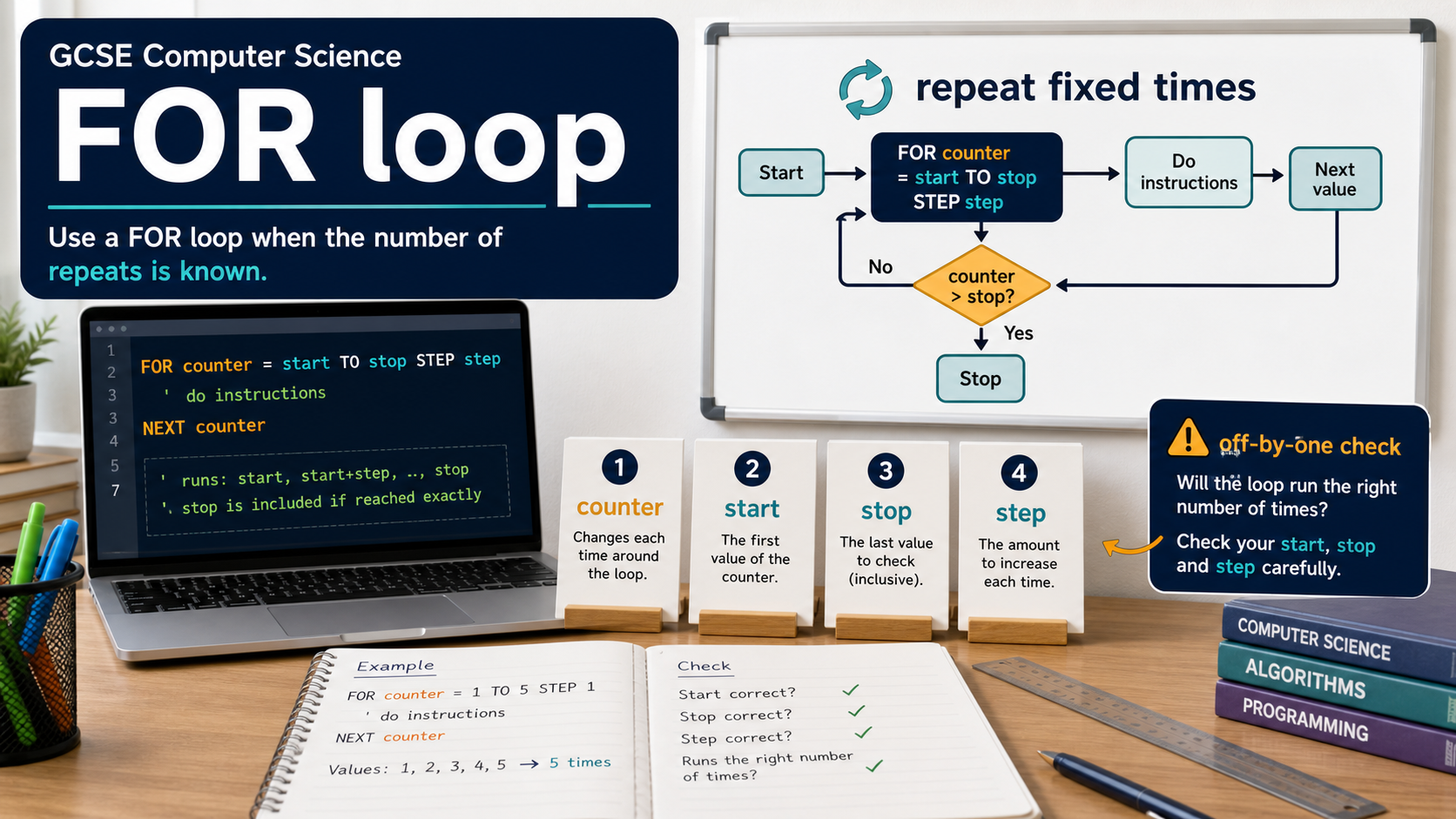
Explanation
A count-controlled loop repeats a known number of times. It often uses a counter variable that changes each pass.
A counted loop is useful when processing a fixed range, printing a fixed number of values or repeating a task for each known item.
Tracing a counted loop means recording the counter and any variables changed inside the loop.
Worked examples
Adding numbers from 1 to 4
total = 0
FOR n FROM 1 TO 4
total = total + n
Answer: The total becomes 10 after adding 1, 2, 3 and 4.
Quick checks
1. Which task suits a count-controlled loop?
- a. Keep asking until password is correct
- b. Output exactly 10 revision questions
- c. Choose between two ticket prices
Reveal answer
Answer: b. Correct. The number of repeats is known.
Not quite. Counted loops are for known repeats.
2. What is the counter in FOR i FROM 1 TO 5?
- a. FROM
- b. TO
- c. i
Reveal answer
Answer: c. Correct. i stores the current loop value.
Not quite. The counter is the variable that changes.
Practice
1. How many times does FOR n FROM 1 TO 3 repeat?
Reveal answer
Answer: 3 times.
Marking: Credit values 1, 2 and 3.
2. A loop outputs numbers 2, 4, 6, 8. What could the step be?
Reveal answer
Answer: 2.
Marking: Credit increasing by 2 each pass.
3. Why is a loop better than copying the same output line 20 times?
Reveal answer
Answer: It is shorter, easier to maintain and less error-prone.
Marking: Credit efficiency, maintainability or reduced mistakes.
4. In a loop that totals five scores, what variable might change besides the counter?
Reveal answer
Answer: The running total.
Marking: Credit total, sum or accumulator.
Exam practice ladder
- Fluency: recall the key term and use it accurately.
- Application: apply the idea to the scenario rather than giving a generic definition.
- Algorithmic reasoning: show the steps, condition or variable change clearly.
- Evaluation: explain why one method, structure or control is suitable.
Answers and marking guidance
Exact answers and marking guidance are hidden under each question. For this lesson, earn marks by naming the correct Computer Science idea, applying it to the scenario and showing the logic or value change clearly.
Common mistakes
- Repeating one time too many or one time too few.
- Changing the wrong variable inside the loop.
- Using a counted loop when the stopping point is unknown.
- Forgetting that the loop body runs once for each counter value.
Extension
Write pseudocode for outputting the first five multiples of 3.
Next lesson
Next, continue with Condition-controlled Loops.
Exam-board guidance
Aplailasain is an independent learning resource and is not endorsed by any exam board.
AQA GCSE Computer Science
AQA GCSE Computer Science: this skill supports problem solving, clear algorithms and accurate programming explanations.
OCR GCSE Computer Science
OCR GCSE Computer Science: expect precise algorithm reasoning, trace work and careful use of programming vocabulary.
Pearson Edexcel GCSE Computer Science
Pearson Edexcel GCSE Computer Science: practise explaining the method as well as giving the final answer or code.
Eduqas GCSE Computer Science
Eduqas GCSE Computer Science: secure the transferable idea first, then check how your class applies it in tasks.
WJEC Wales
WJEC Wales: use accurate terminology and show enough working for the examiner to follow your logic.
CCEA
CCEA: connect the idea to your class route and use the same algorithm, programming or systems vocabulary your teacher uses.