
Lesson overview
Separate what a program receives, what it does and what it displays or returns.
Focus: Input, processing and output.
What you will learn
- Identify inputs, processes and outputs in a problem.
- Choose suitable variable names for input data.
- Explain how processing transforms data.
- Describe output clearly and check it matches the task.
Before you start
- Everyday examples of forms, apps and calculations.
- Basic arithmetic.
- Simple variables are helpful but not essential.
IPO scenarios
Use the calculator, ticket and quiz examples to identify the data entering, the rule applied and the output produced.
Input, processing and output infographic
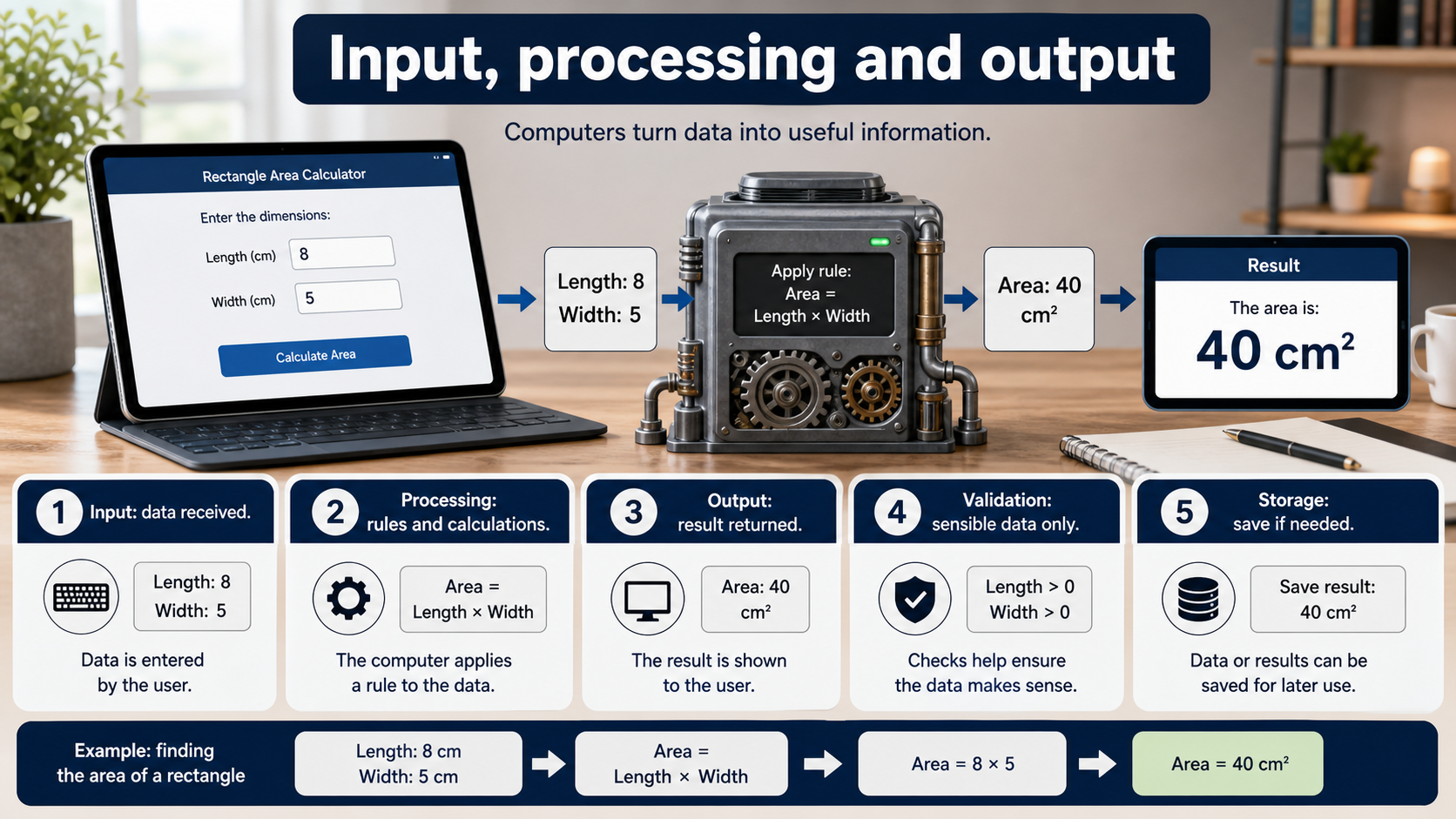
Explanation
Input is data received by a program. It might come from a user, sensor, file or another system.
Processing is the rule or calculation applied to the input. It could compare, calculate, search, sort or format data.
Output is the result the program gives back. It might be displayed on screen, stored in a file, sent across a network or used by another part of the program.
Worked examples
Area calculator
Input: length and width.
Processing: area = length * width.
Output: the calculated area with a suitable unit.
Answer: The IPO model makes the purpose of each variable and step clear.
Quick checks
1. In a temperature converter, what is the input?
- a. The converted result only
- b. The starting temperature value
- c. The monitor cable
Reveal answer
Answer: b. Correct. The program receives the starting temperature.
Not quite. Input is data the program receives.
2. Which example is processing?
- a. Typing the original price
- b. Showing the final total
- c. Multiplying price by quantity
Reveal answer
Answer: c. Correct. Processing transforms the input data.
Not quite. Look for the rule or calculation.
Practice
1. For a login form, name two inputs.
Reveal answer
Answer: Username and password.
Marking: Credit any genuine login input such as email and password.
2. For a quiz score program, describe one process.
Reveal answer
Answer: Compare the user's answer with the correct answer and update the score.
Marking: Credit comparison and score update.
3. For a delivery app, name one output.
Reveal answer
Answer: Estimated delivery time, order confirmation or route information.
Marking: Credit a result produced by the system.
4. Why should variable names match the input meaning?
Reveal answer
Answer: Clear names make the program easier to read, debug and maintain.
Marking: Credit readability and avoiding confusion.
Exam practice ladder
- Fluency: recall the key term and use it accurately.
- Application: apply the idea to the scenario rather than giving a generic definition.
- Algorithmic reasoning: show the steps, condition or variable change clearly.
- Evaluation: explain why one method, structure or control is suitable.
Answers and marking guidance
Exact answers and marking guidance are hidden under each question. For this lesson, earn marks by naming the correct Computer Science idea, applying it to the scenario and showing the logic or value change clearly.
Common mistakes
- Calling every step input.
- Forgetting that output can be stored or sent, not only printed.
- Using unclear variable names such as x when the meaning matters.
- Describing processing as magic instead of naming the rule.
Extension
Create an IPO table for a simple revision timer app.
Next lesson
Next, continue with Sequence, Selection and Iteration.
Exam-board guidance
Aplailasain is an independent learning resource and is not endorsed by any exam board.
AQA GCSE Computer Science
AQA GCSE Computer Science: this skill supports problem solving, clear algorithms and accurate programming explanations.
OCR GCSE Computer Science
OCR GCSE Computer Science: expect precise algorithm reasoning, trace work and careful use of programming vocabulary.
Pearson Edexcel GCSE Computer Science
Pearson Edexcel GCSE Computer Science: practise explaining the method as well as giving the final answer or code.
Eduqas GCSE Computer Science
Eduqas GCSE Computer Science: secure the transferable idea first, then check how your class applies it in tasks.
WJEC Wales
WJEC Wales: use accurate terminology and show enough working for the examiner to follow your logic.
CCEA
CCEA: connect the idea to your class route and use the same algorithm, programming or systems vocabulary your teacher uses.