
Lesson overview
Break problems into parts, ignore irrelevant details, spot patterns and design a solution.
Focus: Computational thinking.
What you will learn
- Use decomposition to split a problem into smaller parts.
- Use abstraction to focus on useful details.
- Recognise patterns that can simplify a solution.
- Turn a problem description into a planned algorithm.
Before you start
- Experience following instructions.
- Basic understanding that programs run ordered steps.
- Confidence listing details from a short scenario.
Problem-solving scenarios
Use the ticket machine and revision app examples below to practise identifying parts, useful details and repeated patterns.
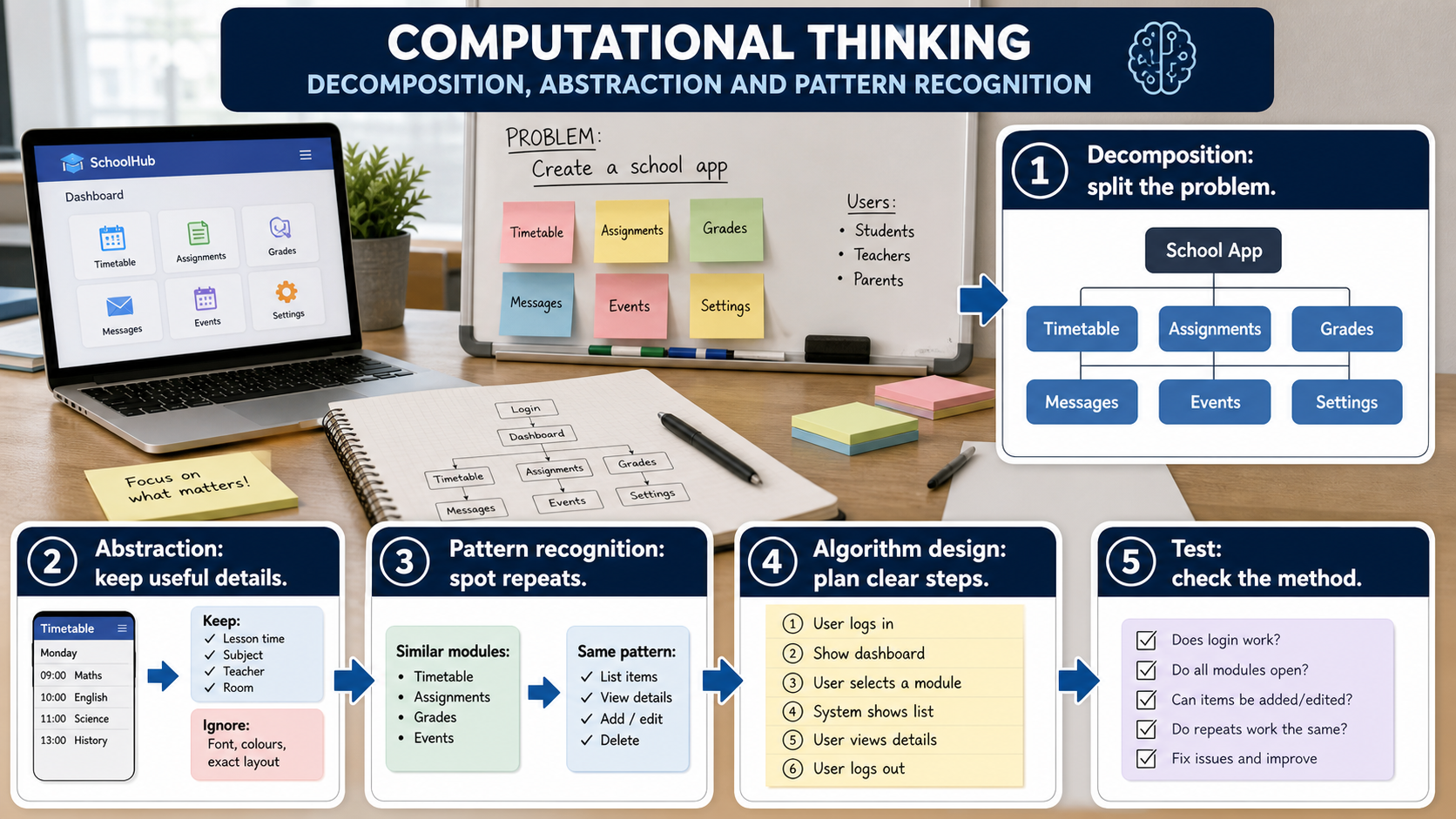
Computational thinking infographic
Explanation
Decomposition means breaking a large problem into smaller problems. A ticket machine might need input handling, price calculation, payment checking and ticket output.
Abstraction means keeping the details that matter for the solution and leaving out the details that do not. The colour of the ticket machine casing probably does not matter when designing the price algorithm.
Pattern recognition means noticing repeated structures. If several ticket types use the same discount rule, one reusable calculation can handle them.
Worked examples
Revision app problem
Problem: design an app that quizzes a pupil on key terms.
Decompose: store questions, ask a question, check the answer, update the score.
Abstract: keep question text, correct answer and score; ignore the phone case colour.
Answer: The problem becomes easier because each smaller part can be planned and tested.
Quick checks
1. Which action is decomposition?
- a. Choosing a brighter screen
- b. Deleting all variables
- c. Splitting a game into login, menu, gameplay and scoring parts
Reveal answer
Answer: c. Correct. Decomposition splits a problem into manageable parts.
Not quite. Look for breaking one problem into smaller problems.
2. Which detail is likely to be abstracted away when planning a bus fare calculator?
- a. The colour of the bus seat
- b. Passenger age
- c. Journey zone
Reveal answer
Answer: a. Correct. Seat colour is unlikely to affect the fare algorithm.
Not quite. Keep details that affect the result.
Practice
1. Decompose an online shop checkout into four smaller tasks.
Reveal answer
Answer: For example: basket total, delivery details, payment check, order confirmation.
Marking: Credit four sensible subtasks.
2. For a login system, name two useful details and one irrelevant detail.
Reveal answer
Answer: Useful: username and password. Irrelevant: background wallpaper colour.
Marking: Credit relevant data needed for login and one harmless irrelevant feature.
3. Explain pattern recognition in a quiz app.
Reveal answer
Answer: Each question can follow the same ask, receive answer, compare, score pattern.
Marking: Credit identifying a repeated process.
4. Why does abstraction help programmers?
Reveal answer
Answer: It reduces complexity so they can focus on details that affect the solution.
Marking: Credit simplifying the problem while keeping important information.
Exam practice ladder
- Fluency: recall the key term and use it accurately.
- Application: apply the idea to the scenario rather than giving a generic definition.
- Algorithmic reasoning: show the steps, condition or variable change clearly.
- Evaluation: explain why one method, structure or control is suitable.
Answers and marking guidance
Exact answers and marking guidance are hidden under each question. For this lesson, earn marks by naming the correct Computer Science idea, applying it to the scenario and showing the logic or value change clearly.
Common mistakes
- Listing random features instead of smaller solvable tasks.
- Removing details that are actually needed for the output.
- Saying abstraction means making the answer vague.
- Spotting a pattern but not using it to simplify the algorithm.
Extension
Choose a school lunch-ordering system and write a decomposed task list for it.
Next lesson
Next, continue with Algorithms, Pseudocode and Flowcharts.
Exam-board guidance
Aplailasain is an independent learning resource and is not endorsed by any exam board.
AQA GCSE Computer Science
AQA GCSE Computer Science: this skill supports problem solving, clear algorithms and accurate programming explanations.
OCR GCSE Computer Science
OCR GCSE Computer Science: expect precise algorithm reasoning, trace work and careful use of programming vocabulary.
Pearson Edexcel GCSE Computer Science
Pearson Edexcel GCSE Computer Science: practise explaining the method as well as giving the final answer or code.
Eduqas GCSE Computer Science
Eduqas GCSE Computer Science: secure the transferable idea first, then check how your class applies it in tasks.
WJEC Wales
WJEC Wales: use accurate terminology and show enough working for the examiner to follow your logic.
CCEA
CCEA: connect the idea to your class route and use the same algorithm, programming or systems vocabulary your teacher uses.