
Lesson overview
Use arithmetic, comparison and logical operators to build expressions in programs.
Focus: Operators and expressions.
What you will learn
- Use arithmetic operators for calculations.
- Use comparison operators to test relationships between values.
- Read logical operators such as AND, OR and NOT.
- Evaluate expressions carefully using the current variable values.
Before you start
- Variables and data types.
- Basic arithmetic.
- Selection and conditions.
Expression practice
Use the points, price and password examples to practise evaluating calculations and comparisons.
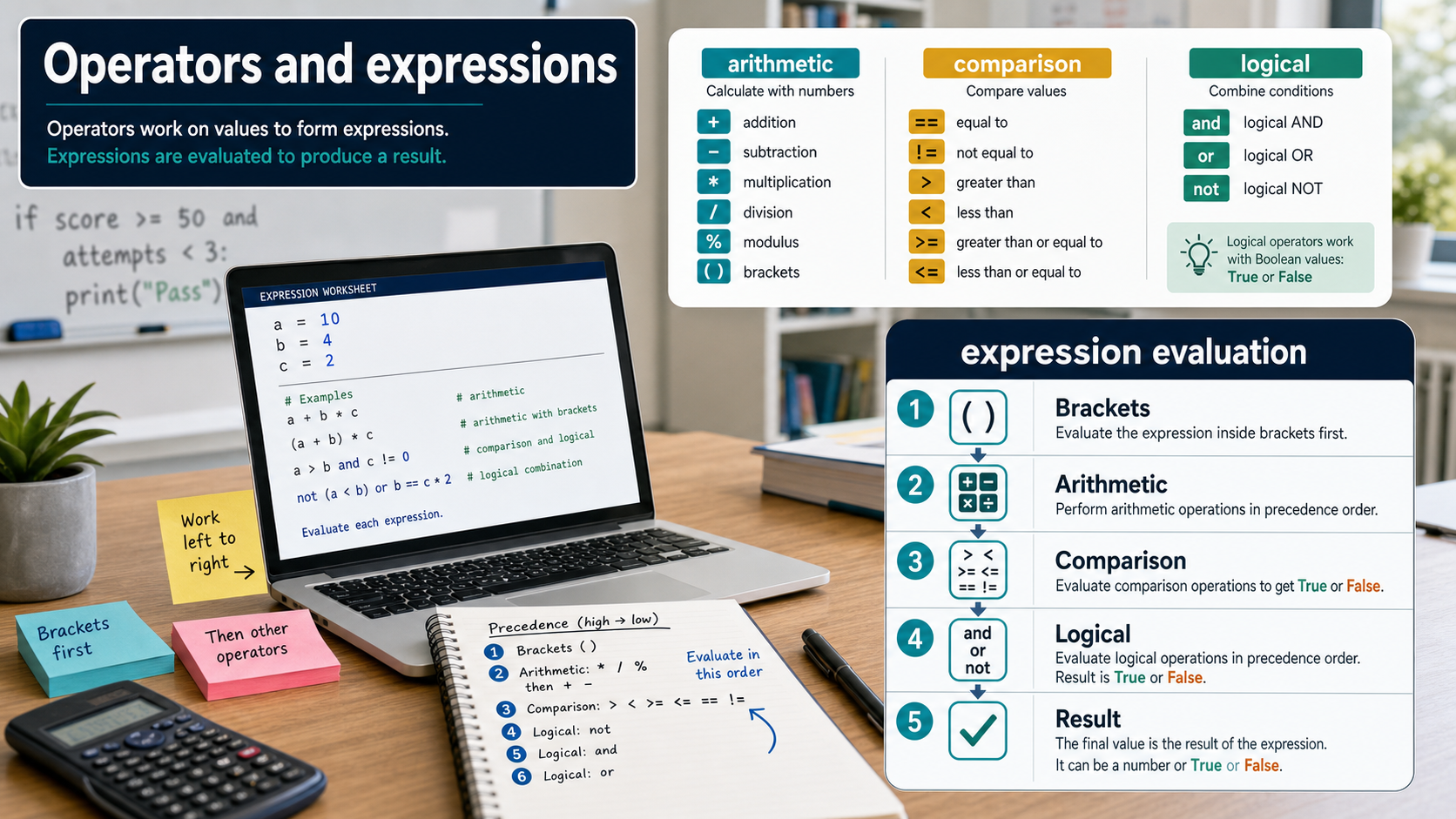
Operators and expressions infographic
Explanation
An operator acts on one or more values. Arithmetic operators calculate results, comparison operators produce true or false, and logical operators combine true or false conditions.
An expression is a combination of values, variables and operators that can be evaluated. For example, score + bonus is an arithmetic expression.
Comparison expressions are often used in selection and loops. For example, age >= 16 is either true or false when age has a value.
Worked examples
Evaluating a price expression
price = 6
quantity = 4
total = price * quantity
Answer: total stores 24.
Quick checks
1. If score is 8, what does score >= 10 evaluate to?
- a. true
- b. score10
- c. false
Reveal answer
Answer: c. Correct. 8 is not at least 10.
Not quite. Compare the current value with 10.
2. Which operator is normally used for multiplication in code-like expressions?
- a. *
- b. +
- c. =
Reveal answer
Answer: a. Correct. The asterisk is commonly used for multiplication.
Not quite. Addition and assignment have different meanings.
Practice
1. If lives = 3, what is lives - 1?
Reveal answer
Answer: 2.
Marking: Credit substituting the current value then subtracting.
2. If age = 15, what is age < 18?
Reveal answer
Answer: true.
Marking: Credit true because 15 is less than 18.
3. Give one expression that checks whether passwordLength is at least 8.
Reveal answer
Answer: passwordLength >= 8.
Marking: Credit equivalent comparison.
4. What does NOT isLocked mean if isLocked is false?
Reveal answer
Answer: true.
Marking: Credit reversing the Boolean value.
Exam practice ladder
- Fluency: recall the key term and use it accurately.
- Application: apply the idea to the scenario rather than giving a generic definition.
- Algorithmic reasoning: show the steps, condition or variable change clearly.
- Evaluation: explain why one method, structure or control is suitable.
Answers and marking guidance
Exact answers and marking guidance are hidden under each question. For this lesson, earn marks by naming the correct Computer Science idea, applying it to the scenario and showing the logic or value change clearly.
Common mistakes
- Confusing assignment with equality testing.
- Evaluating an expression without substituting the current variable value.
- Mixing text and numbers in a calculation without conversion.
- Forgetting that comparisons produce true or false.
Extension
Write three expressions for a game: update score, check lives left and test whether the level is complete.
Next lesson
Next, continue with Boolean Logic and Conditions.
Exam-board guidance
Aplailasain is an independent learning resource and is not endorsed by any exam board.
AQA GCSE Computer Science
AQA GCSE Computer Science: this skill supports problem solving, clear algorithms and accurate programming explanations.
OCR GCSE Computer Science
OCR GCSE Computer Science: expect precise algorithm reasoning, trace work and careful use of programming vocabulary.
Pearson Edexcel GCSE Computer Science
Pearson Edexcel GCSE Computer Science: practise explaining the method as well as giving the final answer or code.
Eduqas GCSE Computer Science
Eduqas GCSE Computer Science: secure the transferable idea first, then check how your class applies it in tasks.
WJEC Wales
WJEC Wales: use accurate terminology and show enough working for the examiner to follow your logic.
CCEA
CCEA: connect the idea to your class route and use the same algorithm, programming or systems vocabulary your teacher uses.